Just Manager Forum
Official Just Manager forum
You are not logged in.
- Topics: Active | Unanswered
#1 2026-05-05 23:32:06
- navigat0r
- Member
- Registered: 2013-02-13
- Posts: 191
Do not show Warning when Deleting Folder on attached USB Stick
When deleting a Folder (USB attached to Router) a Warning is shown: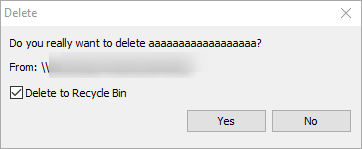
WARN 06.05.2026 01:19:55.412 3188 CUtils::FileOperation: SHFileOperation aborted, operation: 3, what: \\Censored\Media\CensoredGB\zzzzzzzzzzzzz, to:
INFO 06.05.2026 01:19:57.811 12724 CWinMain::PanelItemActivated: panel: 2, item: Log.txt
Although "Delete to Recycle Bin" is checked and Yes is pressed another Message is shown: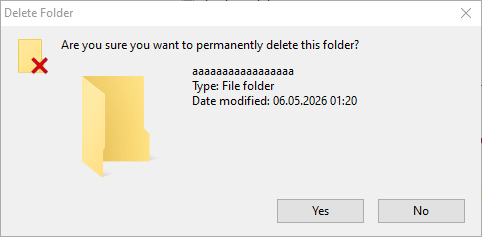
the latter is the correct/expected Message. The first warning should be omitted as
the folder cannot be deleted to recycle bin and cannot be restored.
Win10/11
Offline
#2 2026-05-06 07:21:52
Re: Do not show Warning when Deleting Folder on attached USB Stick
Yes, "Delete to Recycle Bin" option should not be used for the network shares. Will be fixed in the next release.
The first warning is the JM delete confirmation which is controlled by the "Display delete confirmation" option.
The second warning is the Shell delete confirmation which is displayed since Shell file operations are enabled ("Use shell" option).
For internal file operations, only the first confirmation will be displayed.
WARN 06.05.2026 01:19:55.412 3188 CUtils::FileOperation: SHFileOperation aborted, operation: 3, what: \\Censored\Media\CensoredGB\zzzzzzzzzzzzz, to:
This log snippet is not related to the delete confirmation, it's about canceling the file operation.
Offline
#3 2026-05-20 05:34:56
Offline