Just Manager Forum
Official Just Manager forum
You are not logged in.
- Topics: Active | Unanswered
Pages: 1
#1 2026-04-22 17:49:54
- navigat0r
- Member
- Registered: 2013-02-13
- Posts: 179
program no longer operable during copying
I have a USB stick attached to my router.
when copying big files to the USB stick from my hard disk JM cannot be used anymore.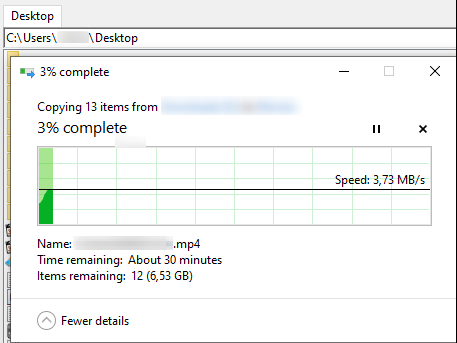
an hourglass is shown and JM cannot be used anymore (clicks are not accepted, navigation does not work)
after copy has finished JM can be used again normally.
Last edited by navigat0r (2026-04-22 18:24:45)
Win10/11
Offline
#2 2026-04-23 04:23:59
Re: program no longer operable during copying
What are the steps to reproduce?
If context menu paste command is used, then operation will be preformed synchronously and UI will be unresponsive during operation. This problem will be fixed in the next release.
Offline
#3 2026-04-29 22:03:08
- vlabaze
- Member
- Registered: 2026-04-29
- Posts: 1
Re: program no longer operable during copying
I didn't have that problem when copying.
http://radikal.host/i/bOsaL0
https://radikal.host/i/bOs1sW
https://radikal.host/i/bOsjDD
Last edited by vlabaze (2026-04-29 22:05:19)
Offline
#4 2026-05-04 21:52:03
- navigat0r
- Member
- Registered: 2013-02-13
- Posts: 179
Re: program no longer operable during copying
the copy issue is no longer present in Beta 1.
But I noticed another issue:
1. Create a Folder eg. test123 locally eg. in Downloads
--> the folder is created and immediately selected/highlighted. [OK]
2. Create a Folder on the attached USB stick (router)
-> the folder is created immediately but the folder is not selected/highlighted. [NOK]
Win10/11
Offline
#5 2026-05-05 06:02:19
Re: program no longer operable during copying
the copy issue is no longer present in Beta 1.
Yes, context menu command invocation has been switched to asynchronous mode in 1.0.0-beta.1.
2. Create a Folder on the attached USB stick (router)
-> the folder is created immediately but the folder is not selected/highlighted. [NOK]
Please try to reproduced on the test version and send me the log.
Also, please create separate threads for new issues.
Offline
#6 2026-05-05 18:14:53
- navigat0r
- Member
- Registered: 2013-02-13
- Posts: 179
Re: program no longer operable during copying
sure, I will create a new report next time.
Issue persists with test version, after tst123 folder created, it is not selected:
INFO 05.05.2026 20:09:34.814 1476 CWinMain::Main: Just Manager 1.0.0-beta.1 01/05/2026, pid: 7888
INFO 05.05.2026 20:09:34.814 1476 CWinMain::InitializeCOM: COM/OLE initialization
INFO 05.05.2026 20:09:34.814 1476 CWinMain::InitializeCommonControls: Common controls initialization
INFO 05.05.2026 20:09:34.814 1476 CWinMain::GetApplicationType: Application type: 1
INFO 05.05.2026 20:09:34.814 1476 CWinMain::ConfigureUserFolderPath: User folder path: C:\Users\user\Downloads\forum_579\JustManager
INFO 05.05.2026 20:09:34.831 1476 CSystemInfo::GetSystemImageLists: System image lists loaded. Used memory: before: 11484 KB, after: 13172 KB
INFO 05.05.2026 20:09:34.843 1476 CWinMain::Main: Loading settings
INFO 05.05.2026 20:09:34.843 1476 CWinMain::RegisterMainWndClass: Main window class registration
INFO 05.05.2026 20:09:34.843 1476 CWinMain::OnCreate: Called
INFO 05.05.2026 20:09:34.843 1476 CLanguage::LoadLanguage: Language file: C:\Users\user\Downloads\forum_579\JustManager\Languages\English.lng
INFO 05.05.2026 20:09:34.867 1476 CXMLWrapper::Load: C:\Users\user\Downloads\forum_579\JustManager\Languages\English.lng loaded successfully
INFO 05.05.2026 20:09:35.131 1476 CPanelManager::StartExplore: panel: 1, task: 0000000002258F90, type: Explore, action: Internal, path: C:\
INFO 05.05.2026 20:09:35.131 1476 CPanelManager::StartExplore: panel: 2, task: 0000000002257C30, type: Explore, action: Internal, path: C:\
INFO 05.05.2026 20:09:35.131 1476 CWinMain::OnCreate: Finished
INFO 05.05.2026 20:09:35.131 1476 CWinMain::CreateMainWnd: Main window: 0000000000030628
INFO 05.05.2026 20:09:35.198 1996 CFolderMonitor::CreateReadDirectoryChanges: path: C:\
INFO 05.05.2026 20:09:35.199 6436 CFolderMonitor::CreateReadDirectoryChanges: path: C:\
INFO 05.05.2026 20:09:35.199 1724 CFolderMonitor::CreateReadDirectoryChanges: path: C:\
INFO 05.05.2026 20:09:42.014 1476 CPanelManager::StartExplore: panel: 2, task: 0000000002258F90, type: Explore, action: User, path: N:\
INFO 05.05.2026 20:09:42.114 11724 CFolderMonitor::CreateReadDirectoryChanges: path: N:\
INFO 05.05.2026 20:09:42.126 1760 CFolderMonitor::CreateReadDirectoryChanges: path: N:\
INFO 05.05.2026 20:09:52.747 1476 COperationsManager::CreateDirectoryFunction
INFO 05.05.2026 20:09:57.547 1476 COperationsManager::CreateDirectoryFunction: item to select: tst123
ERROR 05.05.2026 20:09:57.564 11724 CFolderChangeNotifyThread::ParseReadDirectoryChanges: Transferred 0 bytes, status code: 268, path: N:\
ERROR 05.05.2026 20:09:57.564 1760 CDiskSizeChangeNotifyThread::ParseReadDirectoryChanges: Transferred 0 bytes, status code: 268, path: N:\
INFO 05.05.2026 20:09:58.114 1476 CPanelManager::StartExplore: panel: 2, task: 0000000002258F90, type: Explore, action: Refresh, path: N:\
INFO 05.05.2026 20:09:58.233 4052 CFolderMonitor::CreateReadDirectoryChanges: path: N:\
INFO 05.05.2026 20:10:12.047 1476 CWinMain::OnClose: Closing application
INFO 05.05.2026 20:10:12.130 1476 CXMLWrapper::Save: C:\Users\user\Downloads\forum_579\JustManager\Settings.xml saved successfully
INFO 05.05.2026 20:10:12.132 1476 CWinMain::OnClose: Finished
INFO 05.05.2026 20:10:12.132 1476 CWinMain::UninitializeCOM: COM/OLE uninitialization
Win10/11
Offline
#7 2026-05-06 04:57:12
Re: program no longer operable during copying
INFO  05.05.2026 20:09:57.547  1476 COperationsManager::CreateDirectoryFunction: item to select: tst123
ERROR 05.05.2026 20:09:57.564 11724 CFolderChangeNotifyThread::ParseReadDirectoryChanges: Transferred 0 bytes, status code: 268, path: N:\
INFO  05.05.2026 20:09:58.114  1476 CPanelManager::StartExplore: panel: 2, task: 0000000002258F90, type: Explore, action: Refresh, path: N:\
The item was not selected, because update retrieving failed with status code STATUS_NOTIFY_ENUM_DIR (268) and directory contents were re-read, as it should be with this code. Added item selection for refresh. Will be in the next release.
Offline
#8 2026-05-20 05:30:35
Re: program no longer operable during copying
2. Create a Folder on the attached USB stick (router)
-> the folder is created immediately but the folder is not selected/highlighted. [NOK]
Fixed in 1.0.0-rc.1.
Offline
Pages: 1