Just Manager Forum
Official Just Manager forum
You are not logged in.
- Topics: Active | Unanswered
Pages: 1
#1 2013-08-14 21:12:23
- navigat0r
- Member
- Registered: 2013-02-13
- Posts: 191
arror icon missing on shortcut
I could not find a setting for that so I assume this is an issue:
Win10/11
Offline
#3 2013-08-15 04:23:46
- Kanaduchi
- Member
- From: Chelyabinsk
- Registered: 2013-01-21
- Posts: 246
Re: arror icon missing on shortcut
Icon doesn't change after copy with IShellIcon

Last edited by Kanaduchi (2013-08-15 04:24:01)
Latest version of Just Manager - 0.1 Alpha 54 released on 2014-08-24
Modern icon pack
Offline
#5 2026-05-02 05:53:39
Re: arror icon missing on shortcut
Icon doesn't change after copy with IShellIcon
Icon update logic has been improved in 1.0.0-beta.1, however, sometimes icons are still not updated due to Shell cache update issues.
Offline
#6 2026-05-04 22:14:53
- navigat0r
- Member
- Registered: 2013-02-13
- Posts: 191
Re: arror icon missing on shortcut
confirmed, issue persists, the arrow is not shown
Win10/11
Offline
#8 2026-05-05 20:38:32
- navigat0r
- Member
- Registered: 2013-02-13
- Posts: 191
Re: arror icon missing on shortcut
you are right. I forgot about the setting. this is what i get now: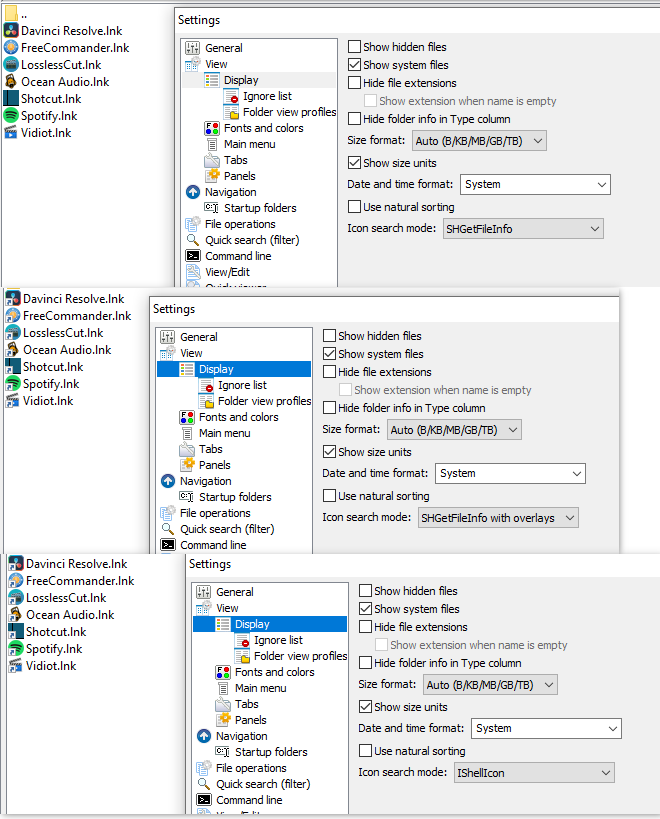
Why is SHGetFileInfo the standard setting if the icons are not displayed correctly? (performance?)
Which one do you suggest to use? Which one is the fastest?
Win10/11
Offline
#9 2026-05-06 05:10:23
Re: arror icon missing on shortcut
Why is SHGetFileInfo the standard setting if the icons are not displayed correctly? (performance?)
SHGetFileInfo is the default since it's faster than the others. The icons are correct, the overlays just aren't displayed.
Which one do you suggest to use? Which one is the fastest?
If the overlays are important for you, use "SHGetFileInfo with overlays" or IShellIcon mode.
You can check which method is faster using trace logs.
My test on C:\Windows\System32.
SHGetFileInfo:
TRACE 06.05.2026 8:08:29.655 6956 CIconsExploreThread::Run: status: finished, panel: 1, time: 0,508 sSHGetFileInfo with overlays:
TRACE 06.05.2026 8:08:56.633 6676 CIconsExploreThread::Run: status: finished, panel: 1, time: 5,828 sIShellIcon:
TRACE 06.05.2026 8:10:01.363 5220 CIconsExploreThread::Run: status: finished, panel: 1, time: 4,392 sOffline
Pages: 1