Just Manager Forum
Official Just Manager forum
You are not logged in.
- Topics: Active | Unanswered
#1 Re: Bugs and Problems » slow copy performance when quick view is turned on » 2026-06-11 09:51:31
when quick view is turned on
when quick preview is turned on
What do you mean by "quick view"/"quick preview"?
Can you please make a screenshot of JM threads info from Process Explorer during copy process?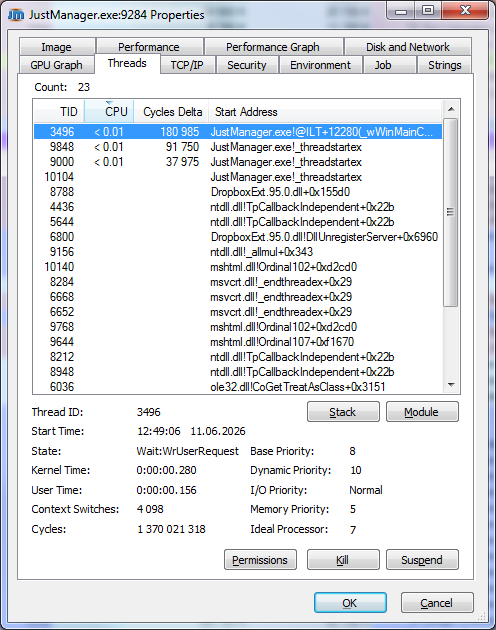
A screenshot is required along with the new log.
#2 Re: Bugs and Problems » incorrect New context menu with deeply nested folders » 2026-06-11 09:07:20
Issues:
1. Reduced New submenu (post #1). Menu is populated by the system. Nothing to fix.
2. "operation stuck" case (post #2, #3). Need full log.
3. Strange case (post #5). It's unclear what happens here since the screenshot info doesn't match the log.
4. Update was not applied (post #7). Need log from the test version.
Post #9
Test case: 5 files copy drag-and-drop from the long path D:\Test\Test\DeepNestedFolders\level_1\...\level_25\test to D:\Test\A
Screenshot states "Copying 165 items from Test to A" and items are "test", "New Text Document.txt".
Case is similar to post #5, so it's issue 3.
Please reproduce on the test version and share the log.
Post #10
New full path is long (path 491 + name 259). JM tries to get the short form, but it's impossible since the path doesn't exist in the file system. Due to a bug, an empty pTo value is passed to SHFileOperation, that's why error 115 occurs.
It turns out, that using the short form for pTo doesn't help for all types of operations, as SHFileOperation converts it to the long form, so path will be used as-is for pTo in the next version.
Your filename is 259 chars long, which exceeds the 255 char limit. A filename validator will be added in the next version.
In all cases, SHFileOperation will fail if pTo path is long.
Now it's issue 5.
Post #11
Test case: 2 files copy drag-and-drop from J:\ to the long path D:\Test\Test\DeepNestedFolders\level_1\...\level_25\test
Screenshot states "Copying 2 items from My_USB(J:) to DeepNestedFolders".
This is similar to issue 3.
Please reproduce on the test version and share the log.
#3 Re: Bugs and Problems » incorrect New context menu with deeply nested folders » 2026-06-08 12:22:59
In case from post #7, you have performed 5 files move drag-and-drop from panel (3) with the long path to panel (1) with path D:\Test\A:
DEBUG 06.06.2026 21:59:44.080 10220 COperationsManager::HDROP_DragAndDropIn: to: D:\Test\A, IDataObject: 00000000022429E0, effect: Move (2)
TRACE 06.06.2026 21:59:44.080 10220 CUtils::GetHDROPItems: count: 5, buffer size: 2672, time: 0,000 s
DEBUG 06.06.2026 21:59:44.081 10220 COperationsManager::AddFileOperation: New operation: 00000000022F2B40, type: ShellMove
TRACE 06.06.2026 21:59:46.104  1408 CUpdateListenerThread::UpdateItems: panel: 3, updates: 5, view updates: 1, time: 0,000 s
TRACE 06.06.2026 21:59:46.542  4036 CUpdateListenerThread::UpdateItems: panel: 1, updates: 15, view updates: 10, time: 0,001 s
TRACE 06.06.2026 21:59:46.556 10192 CUpdateListenerThread::UpdateItems: panel: 2, updates: 5, view updates: 1, time: 0,000 s
Files were moved from long path location, but only 1 update has been applied to the panel (3).
Since the source path is long and Shell operations don't support long paths, JM provides paths to the Shell in short 8.3 form. I assume that the folder update came with a short name instead of a long one, that's why it was not applied. Let's check on the new test version.
Subsequent drag-and-drop operations fail because files are no longer relevant.
Can you reproduce the "operation stuck" case from posts #3/#4?
Tip: you can insert the log into the code block, then it will have scrollbars and take less space.
#4 Re: Bugs and Problems » incorrect New context menu with deeply nested folders » 2026-06-06 12:16:42
This operation was started and completed correctly:
DEBUG 05.06.2026 14:23:42.626 14196 COperationsManager::AddFileOperation: New operation: 00000000022B9820, type: ShellCopy
DEBUG 05.06.2026 14:23:42.626 14196 COperationsManager::AddFileOperation: Operation 00000000022B9820 started, thread: 14040
DEBUG 05.06.2026 14:23:59.451 14196 COperationsManager::OnFinishOperation: Operation 00000000022B9820 finished
It's not the same "operation stuck" case.
About current case:
As I see, you have performed 5 files drag-and-drop from the right panel to the left.
Left path: D:\Test\A
Right path: D:\Test\Test\DeepNestedFolders\level_1\...\level_25\test
What confuses me:
"Destination Path To Long" dialog displays test folder item that is not a part of the operation
"Progress" dialog states that 165 items are copied from Test to A
The last item in the "Progress" dialog is "New Text Document.txt" which is not one of the selected 5 files
Did I understand your test case correctly? If so, please reproduced this case on the test version and send me the log.
#5 Re: Bugs and Problems » New file gets not selected after creation » 2026-06-06 08:20:49
This is the standard folder background context menu. For the New submenu, commands are performed by the system, not by JM, that's why new file is not selected.
IContextMenu::GetCommandString won't provide a textual representation for the New submenu command IDs, that's why it's impossible to determine what the selected command does.
The only solution is to create your own menu, but this is a huge overhead.
#6 Re: Bugs and Problems » incorrect New context menu with deeply nested folders » 2026-06-03 11:47:51
2. NOK, cannot longer create Shortcut, Bitmap, Textdoc, Zip-File and Folder icon changed:
the same issue in Windows Explorer
It's standard folder background context menu that is populated by the Shell. JM doesn't change this menu. As you can see, Explorer displays the same New submenu.
On Windows 7, New submenu is the same for the long paths, but commands produce "Destination Path To Long" error.
OK, so it seems the issue is caused by the long file name. Anyway, I would expect JM to throw an error message:
OK, more tests, delete by hotkey (del) does not work, from context menu seems to work:
According to your log, file operations are not started at all:
DEBUG 03.06.2026 01:36:32.686  9316 COperationsManager::AddFileOperation: New operation: 000000000224BB70, type: ShellCopy
DEBUG 03.06.2026 01:36:32.686  9316 CUtils::_DoDragDrop: Operation will be performed asynchronously, IAsyncOperation: 00000000021F4680, IDataObject: 0000000002181B40
Should be:
DEBUG 03.06.2026 14:29:34.519  6896 COperationsManager::AddFileOperation: New operation: 000000000214E540, type: ShellCopy
DEBUG 03.06.2026 14:29:34.520  6896 COperationsManager::AddFileOperation: Operation 000000000214E540 started, thread: 5484
For some reason, one of the previous operations got stuck. I need full log to troubleshoot this issue.
#7 Re: Bugs and Problems » source path too long » 2026-06-02 09:19:58
Long paths support has been improved in 1.0.0-rc.1. Please check on this version.
#8 Re: Bugs and Problems » Copy - Paste » 2026-05-30 10:40:30
OleFlushClipboard call is required at the program exit to flush data to the clipboard. Will be fixed in the next release.
#9 Re: Bugs and Problems » copy & paste issues » 2026-05-25 05:52:02
issue persists, attached mobile phone cannot be accessed via JM:
Yes, JM doesn't support devices.
- when copy and paste from vmware via CTRL+C then CTRL+V
instead of copying a file from vmware to JU a empty folder with the same name is created
(copy and paste via context menu not via shortcuts CTRL+C/V works as expected)- after connecting my smart phone via usb, then CTRL+C then CTRL+V to copy via MTP
some pictures to JU, no copy file dialog is displayed. after some time the files appear in JU all of the sudden.
I checked with a process monitor tool that JU is working but the dialog is missing.
Also it takes very long to copy, average copy speed is ~500kB/s.
What about these issues? Are they reproducible on 1.0.0-rc.1?
#10 Re: Bugs and Problems » Duplicate Delete MsgBox when using del hotkey » 2026-05-25 05:43:35
I meant that COPYENGINE_E_USER_CANCELLED - abort mapping added in 1.0.0-rc.1.
As I said, deleting via the context menu is a direct Shell command invocation, that's why only the system confirmation is displayed.
Deleting via Delete key is a JM file operation. Since you are using Shell file operations ("Use shell" is checked) and "Display delete confirmation" option is enabled, both JM and the system confirmations will be displayed. With internal file operations ("Use shell" is unchecked), only JM confirmation will be displayed. You can disable JM confirmation by turning off "Display delete confirmation" option.
#11 Re: Bugs and Problems » Duplicate Delete MsgBox when using del hotkey » 2026-05-21 05:03:57
I mapped COPYENGINE_E_USER_CANCELLED to the warn message. Will be in the next release.
Fixed in 1.0.0-rc.1.
#12 Re: Translations » Russian Translation » 2026-05-20 05:56:09
И ещё... Как то очень пугает id=14. Возможно стандартное "Закрыть вкладку" как то получше будет?

В 1.0.0-rc.1 "Удалить вкладку"/"Удалить все вкладки" переименованы в "Закрыть вкладку"/"Закрыть все вкладки".
#13 Re: Suggestions » Несколько пожеланий » 2026-05-20 05:53:44
10. В 1.0.0-rc.1 добавлена настройка "Показывать подтверждение удаления непустой папки".
#14 Re: Old suggestions » deleting folders » 2026-05-20 05:52:30
"Display non-empty folder delete confirmation" option introduced in 1.0.0-rc.1.
#15 Re: Old suggestions » Option to set default sort order for "Modified" column » 2026-05-20 05:51:32
"Default descending sort for dates" option introduced in 1.0.0-rc.1.
#16 Re: Old suggestions » Сортировка элементов » 2026-05-20 05:50:23
В 1.0.0-rc.1 добавлена настройка "По умолчанию сортировка дат по убыванию".
#17 Re: Old bugs » cannot delete shared folder » 2026-05-20 05:48:54
I added explicit share removing via NetShareDel and RemoveDirectory retry in case of ERROR_ACCESS_DENIED. Maybe it helps. Will be in the next release.
Added in 1.0.0-rc.1.
#18 Re: Bugs and Problems » долгое удаление и др.проблема » 2026-05-20 05:46:57
1.0.0-rc.1: теперь папка удаляется в Корзину как один объект.
Так же по возможности хотелось бы что бы при удалении было меньше лишних вопросов, здесь я имею ввиду то, что doublecmd при удалении задает только один вопрос - "удалить выбранный каталог?", в случае с JM получается два запроса на удаление. Знаю, что в настройках можно выставить, что бы удаление происходило вообще без подтверждения, но совсем без него тоже неудобно.
В 1.0.0-rc.1 добавлена настройка "Показывать подтверждение удаления непустой папки".
#19 Re: Old bugs » Невозможно работать из-за ухода окна на задний план » 2026-05-20 05:40:12
Настройка "Выводить на передний план при отпускании кнопки мыши" добавлена в 1.0.0-rc.1.
#20 Re: Old bugs » Системный звук » 2026-05-20 05:38:42
Исправлено в 1.0.0-rc.1.
#21 Re: Old bugs » Error Message when .. is selected instead of a file » 2026-05-20 05:38:15
Fixed in 1.0.0-rc.1.
#22 Re: Old bugs » Do not show Warning when Deleting Folder on attached USB Stick » 2026-05-20 05:34:56
Yes, "Delete to Recycle Bin" option should not be used for the network shares. Will be fixed in the next release.
Fixed in 1.0.0-rc.1.
#23 Re: Old bugs » Downloads missing in System Folders Dialog » 2026-05-20 05:33:32
Desktop, Dokuments and User Folder, etc. is available but Downloads is missing:
"Downloads" folder added to the system folders list in 1.0.0-rc.1.
interestingly shell:downloads also works, but the blue arrow icon is not shown:
Fixed in 1.0.0-rc.1.
#24 Re: Old bugs » program no longer operable during copying » 2026-05-20 05:30:35
2. Create a Folder on the attached USB stick (router)
-> the folder is created immediately but the folder is not selected/highlighted. [NOK]
Fixed in 1.0.0-rc.1.
#25 Re: Old bugs » quick view not working with Log.txt » 2026-05-20 05:25:36
Fixed in 1.0.0-rc.1.